Page 8 - Product Information
- - April 20, 2023
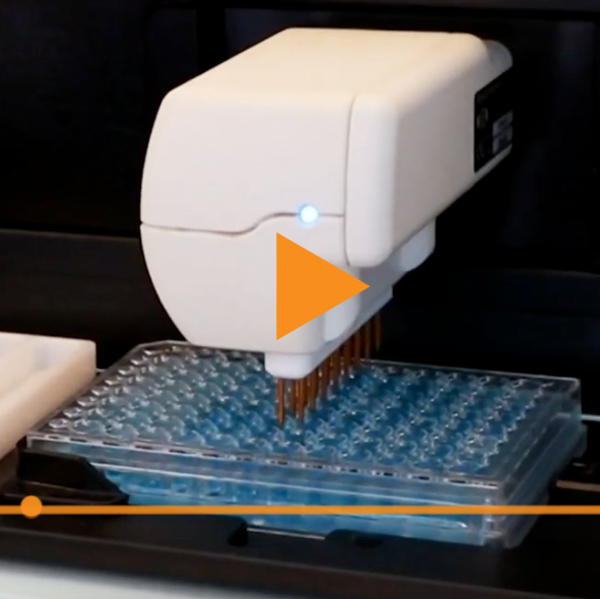
The EVOM™ Auto automates measurements of TEER in epithelial or endothelial monolayers cultured on high throughput screening 96-well plates utilizing our innovative EVOM™ technology, qualitatively measuring cell monolayer health and quantitatively measuring cell confluence by determining an increase or a plateau in tissue resistance.
The video below shows you how to chloride the electrode array on the EVOM™ Auto:
- - April 18, 2023
The EVOM™ Auto automates measurements of TEER in epithelial or endothelial monolayers cultured on high throughput screening 96-well plates utilizing our innovative EVOM™ technology, qualitatively measuring cell monolayer health and quantitatively measuring cell confluence by determining an increase or a plateau in tissue resistance.
The video below shows you how to create a plate file on the EVOM™ Auto:
- - April 13, 2023
The EVOM™ Auto automates measurements of TEER in epithelial or endothelial monolayers cultured on high throughput screening 96-well plates utilizing our innovative EVOM™ technology, qualitatively measuring cell monolayer health and quantitatively measuring cell confluence by determining an increase or a plateau in tissue resistance.
The video below shows you how to download and how to delete a data file EVOM™ Auto:
- - April 11, 2023
The EVOM™ Auto automates measurements of TEER in epithelial or endothelial monolayers cultured on high throughput screening 96-well plates utilizing our innovative EVOM™ technology, qualitatively measuring cell monolayer health and quantitatively measuring cell confluence by determining an increase or a plateau in tissue resistance.
The video below shows you how to run an experiment on the EVOM™ Auto:
- - April 06, 2023
The EVOM™ Auto automates measurements of TEER in epithelial or endothelial monolayers cultured on high throughput screening 96-well plates utilizing our innovative EVOM™ technology, qualitatively measuring cell monolayer health and quantitatively measuring cell confluence by determining an increase or a plateau in tissue resistance.
The video below shows you the features of the homepage on the EVOM™ Auto:
- - April 04, 2023
In vitro models have employed two common methods to quantify changes in endothelial barrier integrity: transepithelial/transendothelial electrical resistance (TEER) and tracer compound permeability.1 TEER is a non-invasive method that quantifies changes in electrical conductance to measure confluency and barrier integrity. Tracer compound permeability uses molecules of defined molecular weights to measure the size exclusion capacity of cell barriers (e.g., 4 kDa FITC-dextran or FD4).1 Using the EVOM™ Manual (EVOM-MT-03-01) with the EndOhm TEER electrode and cell culture permeable supports, this application note describes how to non-invasively evaluate endothelial barrier integrity after cytokine treatment and provides a method to identify vasoactive compounds that have the potential to induce vascular injury. Tracer compound permeability studies are combined with TEER evaluation to elucidate treatment-induced impacts on both intercellular junctions and paracellular transport (Fig...more
- - March 16, 2023
World Precision Instruments' (WPI) legacy Robotic Epithelial Measurement System (REMS) and the new advanced, upgraded version of REMS, EVOM™ Auto, are high-throughput, automated transepithelial/transendothelial electrical resistance (TEER) measurement systems. These robotic systems, combined with EVOM™ technology, expedite TEER measurements.
- - March 03, 2023
Have you got the new EVOM Auto TEER Measurement System for 96-well HTS plates? This short videos shows how easy it is to setup.
- - September 13, 2022WPI is very excited to announce our newest product launch and collaboration with MatTek Life Sciences. The companies will offer both MatTek PermaCell Cell Culture Insert Plates and compatible customized World Precision Instruments’ STX HTS EVOM™ Electrode for TEER to their respective customers, available immediately to the life sciences market.
- - August 05, 2022
The ATC2000 is a low noise heating system for maintaining animal body temperature during expirimental procedures. Here we show you how to use the adaptive mode on the ATC2000 system.
- Press the Config button to access the configuration menu. Press the Config button again until the adaptive mode Enable displays.
NOTE: If the temperature source is set to heater plate, then the adaptive mode cannot be enabled.
2. Press the Up or Down button to enable or disable adaptive mode.
3. Press the Display button to save the new parameters or press the Config button to toggle through the rest of the parameters.
Once the adaptive mode is enabled, Adaptive appears as the mode on the main display window. If you press the Display button again, the alternate temperature displays along with a timer that counts up from the last sampled time. In this case, the temperature was sampled 5 minutes and 42 seconds ago. If the interval is set to 10 minutes, the temperature will be sampled again in...more
- - July 19, 2022
EVOM™ Manual is WPI's newest instrument to measure Trans Epithelial Electrical Resistance (TEER). Let's look at what comes with the system and how easy it is to setup.
- - July 19, 2022
WPI's EVOM system is popular in the research community, both in academia and in industry, and it is commonly used for the evaluation of mammalian cellular health by measuring transepithelial/transendothelial electrical resistance (TEER or TER) of cellular layers.
EVOM™ Manual is powered by the same EVOM™ technology as older EVOM models (EVOMX, EVOM, EVOM2 and EVOM3). It has advanced features for performing experiments more easily. With the new touchscreen display you can now store data as Microsoft® Excel files on a USB flash drive. Just remove the flash drive with all your recorded data from the EVOM™ Manual and plug it into a computer to access and plot your data. It is as simple as it sounds.
- - July 13, 2022
EVOM™ Manual is WPI’s newest instrument to measure Trans Epithelial Electrical Resistance (TEER). Let’s look at how to set it up and take voltage measurements.
- Power on the EVOM™ Manual using the power switch on the rear panel.
- Insert the USB flash drive provided with the system into the USB port on the side of the meter.
- By default, the filename is plate1. You may choose a prefix that auto-indexes or a unique file name:
- Press and hold the Store button on the main screen for 2 seconds or press Store Screen on the Setup menu to configure your stored data files.
- To use a prefix and auto-indexing, activate the Auto Index radio button. Auto indexing sets the name to a numeric sequence with the name, a prefix and a sequential number (name_prefixN). Then, press Store Prefix to enter a file name. Or, to use a unique file name, deactivate the Auto Index radio button. Then, select File Name to enter a new name.
- Press Clear.
- Use the keypad to enter a new name.
- Press Enter.
- Press Setup to access...more
- - July 12, 2022
WPI’s EVOM™ technology is the gold standard for delivering stable and repeatable Trans Epithelial Electrical Resistance (TEER) measurements. Here are nine reasons to trust the new EVOM Manual TEER Meter for qualitatively measuring cell monolayer health and quantitatively measuring cell confluence.
- - July 11, 2022
EVOM™ Manual is WPI’s newest instrument to measure Trans Epithelial Electrical Resistance (TEER). Let’s look at how to set it up and take resistance measurements.
Power on the EVOM™ Manual using the power switch on the rear panel.
Insert the USB flash drive provided with the system into the USB port on the side of the meter.
By default, the filename is plate1. You may choose a prefix that auto-indexes or a unique file name:
- Press and hold the Store button on the main screen for 2 seconds or press Store Screen on the Setup menu to configure your stored data files.
- To use a prefix and auto-indexing, activate the Auto Index radio button. Auto indexing sets the name to a numeric sequence with the name, a prefix and a sequential number (name_prefixN). Then, press Store Prefix to enter a file name. Or, to use a unique file name, deactivate the Auto Index radio button. Then, select File Name to enter a new name.
- Clear.
- Use the keypad to enter a new name.
- Press Enter.
Press Setup to access...more

Recent Posts